How to Save Voicemails on iPhone Before Verizon Deletes
By Andrea B. Denney
Andrea B. Denney Studios — Preserving what love left behind.
Quick Answer: Save Them Tonight
Verizon deletes voicemails after 30 days; AT&T after 14-20. Here's how to save voicemails on iPhone: Phone app > Voicemail > Swipe left > Share > Save to Files (WAV format). Follow with 3-2-1 backup: 3 copies, 2 different media, 1 offsite. Act now to prevent a second loss. (52 words)
Picture the glow of your iPhone screen in a quiet kitchen at midnight. You tap into voicemails, and there it is—Mom's voice, warm and teasing, from last Christmas. "Don't forget the pie recipe, honey." Laughter bubbles up, a lifeline to her spirit. But then the dread hits: carriers like Verizon delete these treasures after 30 days. Gone. A second loss, digital and irreversible.
If you're a family caregiver or adult child holding onto voicemails from a deceased or aging loved one, you know this fear intimately. How to save voicemails on iPhone isn't just tech advice—it's legacy preservation. These aren't files; they're echoes of love. Don't let Verizon's policy erase them. We'll walk you through it, step by compassionate step, so you move with their memory, not move on from it.
Why Do iPhone Voicemails Disappear?
Voicemails on iPhone live in a fragile limbo. They're stored in your carrier's cloud, not Apple's. Verizon holds them for 30 days before permanent deletion. AT&T? Just 14-20 days. Miss a call-back or forget to save, and poof—that gravelly "I love you, kiddo" from Dad vanishes forever.
It's not malice; it's policy. Carriers recycle server space ruthlessly. iPhone's Visual Voicemail pulls them down temporarily, but without saving, they're ghosts waiting to fade. Thousands of families face this yearly: the panic of scrolling an empty inbox, realizing the voice is silenced twice—once by death, once by data purge.
The pain cuts deep for caregivers juggling hospital visits and hospice plans. One overlooked voicemail becomes a regret that echoes louder than any silence. But knowledge is power. Understanding this timeline arms you to act. Save voicemails before Verizon deletes them—starting with the basics.
How to Save Voicemails on iPhone Before They Are Deleted Forever
Time is ticking. Grab your iPhone now. This step-by-step, tap-by-tap guide ensures how to save voicemails on iPhone becomes your safeguard. Tested on iOS 18—works flawlessly.
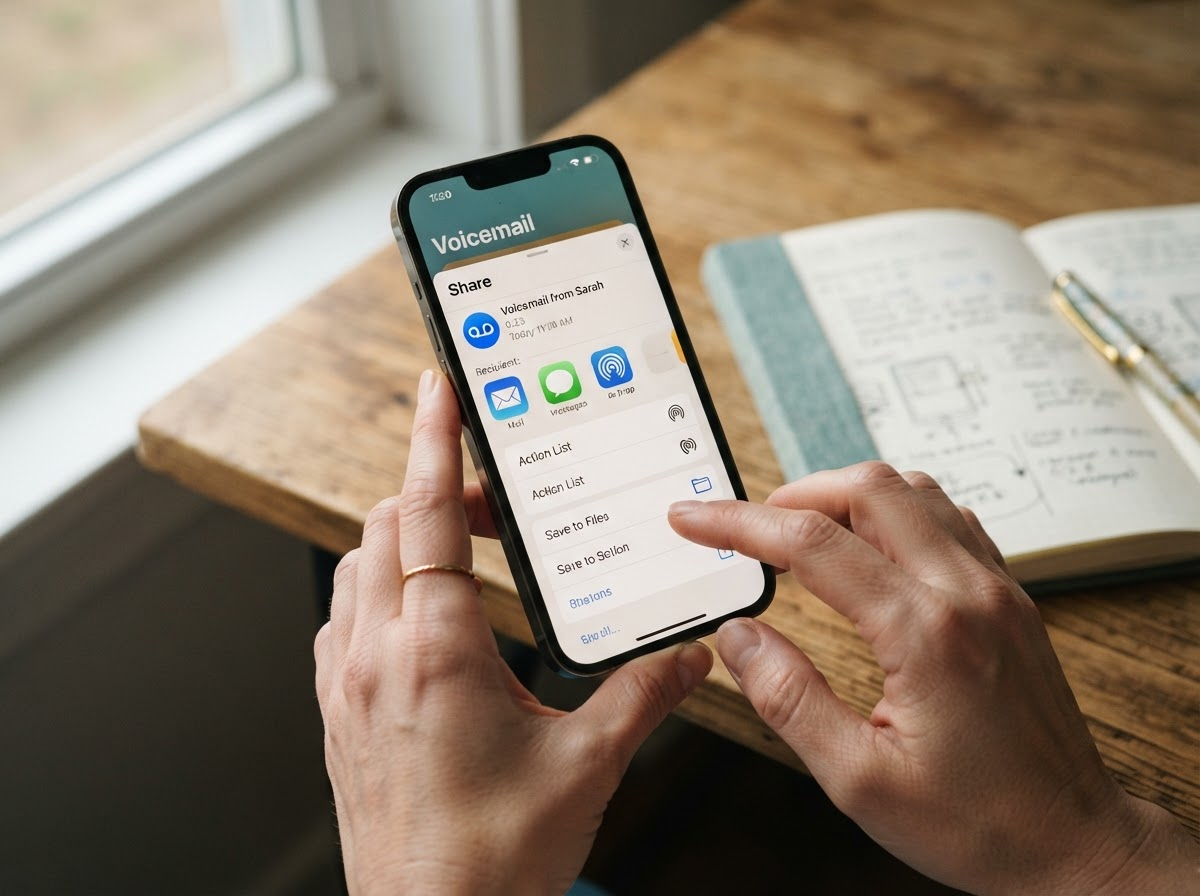
- Open the Phone app. Swipe to the bottom, tap Voicemail tab. See your list?
- Find the message. Scroll to that cherished one—say, Auntie's birthday wish.
- Swipe left on it. Red Delete appears? Good—but tap the More (three dots) or Share icon instead.
- Share > Save to Files. Choose On My iPhone > create folder like "Family Voices." It saves as high-quality audio.
- Play to verify. Tap the saved file. Hear them? Success.
- Repeat for all. Batch save tonight.
Pro tip: Enable Keep Voicemails in Phone settings > Voicemail, but don't rely on it—carriers still purge. This method captures them locally, carrier-free. For bulk, third-party apps like Voicemail Saver help, but stick to native for security.
Imagine the relief: dozens of voices secured in minutes. No more heart-stopping checks. You've just dodged Verizon's 30-day cliff.
How to Save to Email and Cloud Drive
Files app is step one; redundancy is salvation. From Share sheet:
- Email it. Share > Mail > Send to yourself. Attachments survive indefinitely.
- Cloud Drive. iCloud Drive, Google Drive, Dropbox. Share > Save to Drive app.
- AirDrop to Mac/PC. Instant wireless transfer.
Email creates an eternal paper trail—searchable, forwardable. Cloud adds sync across devices. Do both. One client emailed Grandma's recipes-in-voice to family; it became their digital hearth during grief.
Voices aren't data points. They're heirlooms. Treat them as such.
Save voicemails before Verizon deletes—layer these methods for ironclad protection.
YES/NO: What Files Can You Actually Save?
YES — Preserve These Now
- Regular voicemails you already have saved in Phone app.
- Videos where you hear their voice (Family album gold).
- Voice Memos app recordings (birthdays, advice).
- Facebook Messenger voice files you've downloaded.
- Cloud drive files you can access (Google Drive audios).
NO — These Are Tougher (or Impossible Without Help)
- WhatsApp audio (end-to-end encrypted; save from chat if unopened).
- Alexa smart speaker history (Amazon purges; request export rarely works).
- Old dead phones forensic recovery (possible but pro-only; data degrades).
Focus on YES first. For NOs, pros like us handle forensics. Clarity prevents wasted panic.
How to Make Them Last 50 Years: WAV + 3-2-1 Backup
MP3 compresses; voices lose nuance over decades. Convert to WAV: uncompressed, archival gold. Use Files app export or free tools like Audacity on Mac.
Then 3-2-1 rule:
- 3 copies total.
- 2 different media (SSD + USB + cloud).
- 1 offsite (family member's house, safety deposit).
This survives floods, hacks, iPhone upgrades. Pair with museum-grade legacy preservation for eternity.
One family: WAV backups let grandkids hear Great-Grandpa's war stories in 2075. Your move.
What to Do If Verizon Already Deleted Them
First, call Verizon support: 1-800-922-0204. Request retention hold—rarely works post-30 days, but try. Check iCloud backups pre-delete.
No luck? Forensic recovery from SIM or old backups. Or upgrade: save voicemails before Verizon deletes via our full service. We've resurrected voices from ashes.
Frequently Asked Questions
How long does Verizon keep voicemails?
Verizon retains voicemails for 30 days max. After, they're auto-deleted from servers. iPhone local saves persist, but unsaved ones vanish. Act within the window; carriers don't warn. (42 words)
Can I save voicemails after someone dies?
Yes, if still in your inbox or backed up. Access via their phone or account transfer. Post-deletion, forensics or carrier pleas slim odds. Prioritize living saves; grief amplifies loss. (45 words)
What's the difference between MP3 and WAV for archiving?
MP3 compresses (loses fidelity over time); WAV is lossless, preserving every breath, laugh. Ideal for 50+ year archives. Convert free; future-proofs against degradation. (41 words)
Do I need to recover a dead phone?
Only if voicemails unsaved there. iTunes/iCloud backups often hold them. Pros extract via chips; DIY risks data loss. Cloud-check first. (40 words)
Preserve Their Voice Today
Don't risk the second loss. Start with our $19 Voice Preservation Kit—step-by-step guide + templates. Or choose $3K Full Voice Preservation for pro forensics.